Many people forget their router's username and password. Other people don't even know their router's default login. If you're having the same troubles, there's no need to worry. There are a few different options
you can try.
Use the Router's Default Username and Password
This is probably the easiest and most reliable solution. All routers come with documentation or,
most commonly, a label on the router itself with its default username and password. They are generally on the back or underside of the router.
Look Up the Default Username and Password
If you can't find the label or documentation with your router's default login information, look for your router in the dropdown below. By looking up your router'sserial number
or model number, you can find the default login through our database or the
manufacturer's website.
Choose your router from the list below:
Brand
Model
Protocol
Username
Password
2WIRE
HOMEPORTAL Rev. SBC YAHOO! DSL
(none)
2Wire
(none)
2WIRE
ALL WIFI ROUTERS
HTTP
(none)
Wireless
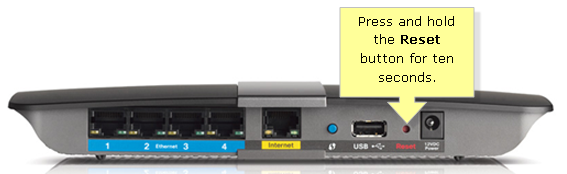
Factory Reset
If you've alreadychanged your password or username and forgotten it, you can
simply reset the router instead. By resetting it to its factory settings, the default
login and password will be restored. The reset button on most routers is very small and can be hard
to find. You'll need a matchstick, pin, pencil nib or other thin item to press it down for around fifteen
seconds.
Forward Ports Without a Password
By using Universal Plug and Play (UPnP), you can alternatively forward ports without requiring knowledge of the password. Many routers
will allow applications to open ports through the router. If you have a UPnP-enabled router, it
will automatically open the required ports. To forward ports of your choosing, you can use UPnP
PortMapper. This is a more complex solution than the others and may be difficult for beginners to
implement.